
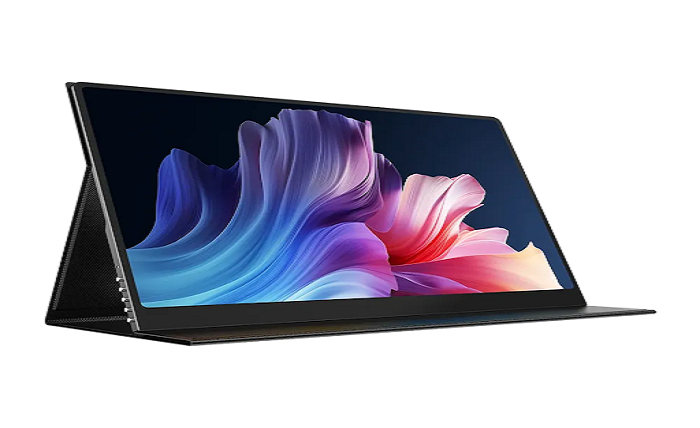
One laptop screen for your tabs, chats, and video calls ever seems too small?
Extra screens in 2026 have moved beyond office desks. So many people are working from home, cafés, hotels, co-working spaces, and even kitchen tables.
That work feels less jumbled with a second screen. You can have your primary item in front of you and move around support things like notes, calendars, or messages, to the side.
Why Extra Screens Help
Keep Switching Windows to a Minimum with the portable monitor.
For example:
- Writers can keep research on one screen and their draft on the other.
- Designers can place tools on one display and the canvas on another.
- Students can watch a lecture while taking notes.
- Support teams can keep chat tools open beside order details.
Best Setups for Different Work Styles
1. Laptop Plus One Side Display
This is the simplest setup. Place your laptop in the center and the second display on your stronger side.
Use it for:
- Email and calendar
- Notes
- Chat apps
- Research pages
- Reference files
2. Vertical Screen for Reading
A vertical display is useful if you read long pages, code, PDFs, or reports. Instead of scrolling again and again, you can view more content at once.
Good uses include:
- Coding
- Editing documents
- Reviewing contracts
- Reading long articles
- Managing task lists
3. Dual-Screen Travel Setup
For travel, keep the setup light.
A travel setup should focus on:
- Low weight
- Fast setup
- Strong case or sleeve
- Stable stand
- USB-C connection when possible
Features That Matter in 2026
Good Stand Options
The stand matters more than many people think. A weak stand can make the screen wobble, which becomes annoying during long work sessions.
Look for a setup that allows:
- Comfortable viewing angle
- Stable placement
- Easy height adjustment, if possible
- Landscape and portrait use
Clear Text
For productivity, sharp text is often more important than flashy specs. If you read and write all day, choose a display that makes small text easy on your eyes.
Light Weight
A screen that looks fine on paper may feel annoying if you carry it daily. Check the full carry weight, including case, stand, and cables.
Smart Setups for Modern Work
Some users now prefer screens with built-in smart features. An AI portable monitor can suit people who want a more flexible work setup with fewer extra devices.
A smart display can be useful when you want to:
- Work with fewer accessories
- Join calls while keeping your laptop screen free
- Use apps in a more flexible way
- Build a cleaner desk layout
Example Productivity Layouts
For Writers and Editors
Main laptop screen:
- Draft
- Editing tool
- CMS
Second screen:
- Research
- Outline
- Style notes
- Source pages
For Customer Support
Main laptop screen:
- Chat dashboard
- Ticket system
Second screen:
- Customer order details
- Saved replies
- Internal notes
- Policy pages
For Students
Main screen:
- Class notes
- Assignment file
Second screen:
- Lecture video
- Reading material
- Online textbook
For Managers
Main screen:
- Video call
- Presentation
- Main document
Second screen:
- Meeting notes
- Agenda
- Team chat
- Calendar
5 Portable Monitor Recommendations for Multitasking and Productivity
Choosing the right portable monitor depends on how you work. Some users need a light second screen for travel, while others need a sharper display for documents, dashboards, or creative tasks. Here are five options from different brands that can fit common productivity setups in 2026.
1. UPERFECT 15.6″ FHD Portable Monitor
The UPERFECT 15.6″ FHD Portable Monitor is a practical choice for people who want a simple second screen for writing, support work, meetings, research, and travel. It has a 15.6-inch IPS display, 1080p resolution, USB-C and mini-HDMI connectivity, and a lightweight design, making it useful for laptop users who want more workspace without adding a full desktop monitor.
2. ASUS ZenScreen
ASUS ZenScreen monitors are a good fit for users who want a portable screen that is easy to set up in different work environments. The ZenScreen line is designed to boost productivity and support entertainment while on the go, with compact and versatile models for travel, remote work, and flexible desk setups.
3. Lenovo ThinkVision M14d
The Lenovo ThinkVision M14d is a strong option for professionals who want a compact screen with sharper text than standard Full HD. It has a 14-inch IPS display, 2240 × 1400 resolution, 300 nits brightness, 100% sRGB color coverage, two USB-C ports, and an adjustable tilt and height stand. This makes it especially useful for reading, writing, reviewing documents, and working while traveling.
4. ViewSonic VA1655
The ViewSonic VA1655 is a 15.6-inch Full HD portable monitor built for productivity on the go. It is designed for business travelers, remote workers, and digital nomads, and includes an anti-glare screen, 1080p resolution, USB-C, and mini-HDMI. It works well as a second screen beside a laptop or tablet for email, chat, dashboards, notes, and daily office tasks.
5. Dell C1422H
The Dell C1422H is a compact 14-inch portable monitor for users who want a business-friendly second display. Dell describes it as the Dell 14 Portable Monitor, and it is suitable for users who need a lightweight extra screen for productivity, meetings, and travel. Its smaller size makes it easier to carry than larger 15.6-inch or 16-inch models.
When a Dedicated Display Collection Helps
People who compare many sizes, stands, and use cases may find a dedicated category page useful.
A page like UPERFECT portable monitor can help you study common screen sizes, connection types, and layout options before choosing.
Conclusion
In 2026, the best desk is not the one with the most screens. That particular one, the one that allows you to operate smoothly and efficiently. It is a connecting link between the tools you have and the work you can accomplish. Functions like writing, calls, research, support work, or planning are all easier with at least one more display for many people.